The strongest password is useless if you cannot remember it well enough to use it—and trying to memorize dozens of complicated passwords usually leads to the same bad habits: reused passwords, predictable variations, and frustrating resets.
The better approach is surprisingly simple: remember only the passwords that truly need to live in your head, and let a password manager handle the rest. For the few passwords you do need to remember, a long, random passphrase can give you a useful combination of security and memorability.
- Learn what actually makes a password strong.
- Create a memorable password using genuinely random words.
- Use memory techniques without relying on information strangers can find about you.
- Avoid common tricks that look secure but are easy to predict.
- Know when to use a password manager, MFA, or a passkey instead.
- Handle restrictive website password rules without sacrificing more security than necessary.
Why Creating a Password You Can Remember Is So Difficult
Human memory is good at remembering meaning, stories, images, and patterns. It is much worse at storing long strings of arbitrary characters that have no connection to anything familiar.
That creates a basic conflict. Security benefits from unpredictability, while memory tends to prefer familiarity.
Think about the last time you sat at a checkout page, certain you knew the password, and cycled through three near-identical versions before giving up and clicking “forgot password.” That moment is not a personal failing. It is the predictable result of asking memory to do a job it was never suited for.
When people are expected to remember too many credentials, they naturally simplify them. They reuse a base password, change one number, add a symbol, or create a predictable pattern for every website.
That is why the goal should not be to build a perfect memory system for 50 different passwords. The goal is to reduce how many passwords you actually need to remember.
What Actually Makes a Password Strong?
A strong password is not simply one that looks complicated. The important qualities are length, uniqueness, and unpredictability.
Length matters
Longer passwords generally provide more room for uncertainty, especially when they are made from independently selected characters or words. A long passphrase can therefore be easier to remember than a short password packed with symbols.
This is also where mainstream security guidance has shifted in recent years. The emphasis has moved away from forced character mixing and toward length, uniqueness, and screening credentials against known breached passwords—largely because complexity rules tend to produce the same tired workarounds in practice.
There is no magical character where a password suddenly becomes safe. Think of length as one part of the equation rather than a magic threshold.
Every account needs a unique password
A password can be extremely strong and still create a major problem if you reuse it. When the same credential protects multiple accounts, one compromised service can put other accounts at risk.
Here is why that matters in practice: when a batch of stolen email-and-password pairs appears from one breached site, attackers routinely replay those same pairs across banking, email, shopping, and social platforms in bulk. Your password does not have to be guessed. It only has to be reused somewhere else.
Even small changes are not enough. A system such as MyBase-Gmail, MyBase-Facebook, and MyBase-Bank still follows a predictable pattern.
Randomness matters more than “looking complex”
A password such as P@ssw0rd! looks clever but follows a familiar substitution pattern. Replacing letters with similar-looking numbers or symbols does not automatically make a password unpredictable.
The real advantage comes from making the password difficult to anticipate, not from making it visually unusual.
How to Create a Strong Password You Can Remember
Use a random passphrase
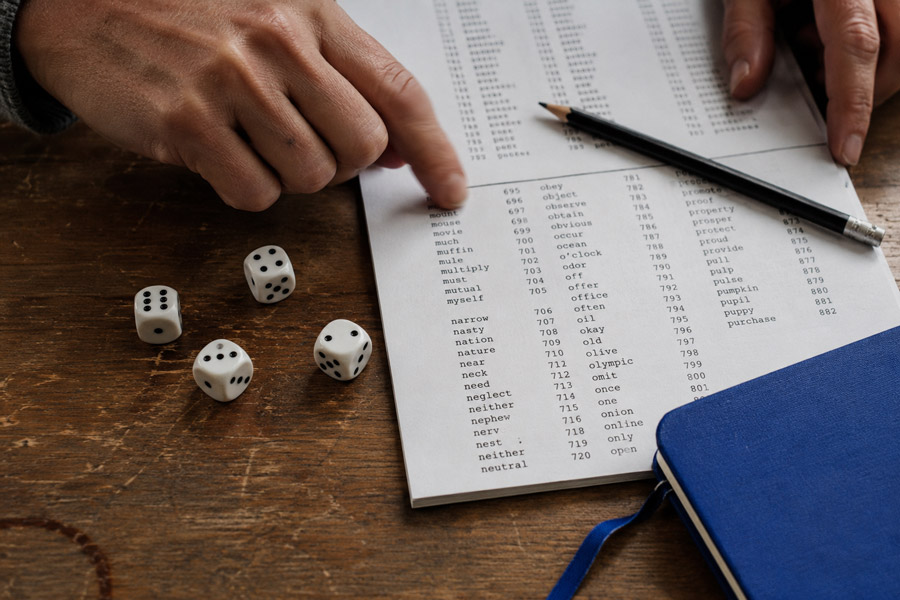
For a password you genuinely need to memorize, one of the most practical approaches is a passphrase made from several unrelated words selected randomly.
Think of the difference between choosing words because you like them and choosing words without knowing what the next word will be. The second method creates much more unpredictability.
Build your passphrase step by step
- Choose several unrelated words using a random method.
- Keep the words independent rather than connected by a personal theme.
- Use a separator such as a space or hyphen when allowed.
- Add a number or symbol only when useful or required.
- Never reuse the finished passphrase on another account.
“A random method” is the part most people skip. In practice this means using dice with a printed word list, or the passphrase option built into most password managers—anything that removes your own taste from the selection.
For example, a pattern such as river-lantern-cactus-orbit is easier to visualize than a random string of characters. The important point is that the words should be selected randomly rather than chosen because they have personal meaning.
Random words are not the same as meaningful words
Something like CoffeeLondonSummerFootball may feel random because it contains several unrelated ideas. In reality, every word was chosen by the same person using familiar associations.
A strong passphrase is not secure because the words are strange. It is secure because the combination is difficult to predict.
How to Make a Passphrase Easier to Remember
Create a ridiculous mental picture
Your brain can often recall an unusual image more easily than a list of unrelated words. Turn the words in your passphrase into one exaggerated scene.
Imagine a blue tiger riding a bicycle through a library while holding a pineapple. The stranger the image, the easier it may be to use it as a memory cue.
Use private associations, not public information
A personal memory can help with recall, but avoid building passwords from facts someone could discover online.
- Pet names
- Birthdays
- Family names
- Hometowns
- Favorite sports teams
- Anniversaries
- Publicly shared hobbies
A memorable password does not have to be personal. A private mental association can be enough.
Practice active recall
After creating a passphrase, type it from memory instead of repeatedly reading it from a note. Recall is strengthened by trying to retrieve information, not simply looking at it.
Generally speaking, a few deliberate repetitions on the first day and a handful over the following week are enough for a passphrase to settle in. If you still cannot reproduce it after that, the passphrase is probably too long for you rather than too weak.
This is also a good reason not to make your passphrase needlessly complicated. The goal is to create something that is difficult for an attacker to predict but practical for you to reproduce accurately.
Password Tricks That Look Smart but Are Predictable
Adding a number to a common word
Changing Summer to Summer2026 does not magically create a strong password. Numbers connected to seasons, years, birthdays, or other obvious patterns are common choices.
Adding one symbol
The same problem applies to passwords such as Welcome! or Password!. Adding punctuation to a predictable word does not remove the underlying predictability.
Predictable substitutions
Replacing letters with similar-looking characters, such as turning o into 0 or a into @, is a well-known password pattern.
Keyboard patterns
Sequences such as qwerty, asdfgh, or 123456 are easy to type and easy to predict. Convenience at the keyboard is not the same as security.
Which Passwords Should You Remember?
This is where a practical password strategy becomes much easier.
| Situation | Best approach |
|---|---|
| Password manager master password | Memorable, long passphrase |
| Primary email used for password resets | Memorable passphrase plus strong MFA |
| Device or laptop unlock | Memorable passphrase or PIN you can type quickly |
| Most website accounts | Random password generated and stored by a password manager |
| Account supporting a passkey | Use a passkey when appropriate |
| Important account | Unique password plus MFA or passkey |
Most guides stop at the master password, but your primary email deserves the same care. It is the reset route for almost everything else you own, which makes it a single point of failure worth protecting with both a memorable passphrase and a second verification step at sign-in.
The key question is not “How can I remember every password?” It is “Which passwords actually need to be remembered?”
Let a Password Manager Solve the Memory Problem
A password manager can generate long, random, unique passwords for your accounts and store them securely. Instead of memorizing dozens of credentials, you remember one strong master password.
This removes the main reason people create predictable password systems in the first place.
Your password manager can handle the repetitive work while your memory is reserved for the one credential that matters most.
One caveat worth knowing before you start: with most reputable managers, nobody can recover your master password for you. That is the point of the design, but it also means the setup step that matters most is storing your recovery kit or emergency access option somewhere safe and offline.
What to look for in a password manager
- Strong encryption and secure credential storage
- Support across the devices you use
- Password generation, including a passphrase option
- Automatic filling of login details
- Support for multifactor authentication
- Alerts for reused, weak, or breach-exposed passwords
- Passkey storage, so you are not locked to a single platform later
- A clear account recovery process you set up in advance
What If a Website Has Bad Password Requirements?
Not every website gives you ideal options.
If the site limits passwords to eight or twelve characters
Use the longest password the site allows, make it unique, avoid personal information, and enable additional protection such as MFA when available.
If the site requires symbols and uppercase letters
Follow the requirement, but do not confuse the requirement with the real source of strength. Use as much length and unpredictability as the site permits.
If spaces are not allowed
Join randomly selected words with another accepted separator. You can still create a memorable passphrase without spaces.
If pasting is blocked
Some sites still disable paste in the password field, which quietly pushes people toward shorter, hand-typed passwords. Use your password manager’s browser extension or app autofill instead of shortening the password to something you can retype.
If the site forces frequent password changes
Do not change a strong password simply for the sake of changing it when there is no security reason. A new password should be created when compromise is suspected, confirmed, or otherwise warrants replacement.
Passwords, Passphrases, and Passkeys: Which Should You Use?
These approaches solve different problems.
- Password: Useful when generated and stored automatically.
- Passphrase: Practical when you must remember a credential yourself.
- Passkey: A passwordless option when the service supports it.
Passkeys have moved quickly from novelty to everyday option, and most major platforms now offer them by default rather than as a hidden setting. The rollout is still uneven, though. Support thins out on banking, government, and smaller legacy services, and moving credentials between ecosystems is not yet as smooth as it should be—which is why passwords remain the fallback and the recovery path for the foreseeable future.
For most people, the strongest everyday system is simple: use passkeys where appropriate, let a password manager generate unique passwords for ordinary accounts, and reserve your memory for a small number of important credentials.
Common Strong-Password Myths
“A password is strong because it contains a symbol.”
A symbol can help meet a site’s requirements, but one symbol does not make a predictable password unpredictable.
“I need to change every password every 90 days.”
Frequent forced changes can encourage shorter, reused, or predictable passwords. Current security guidance has moved firmly away from calendar-based resets for exactly that reason. Change credentials when there is a meaningful security reason.
“A memorable password cannot be secure.”
It can be secure when memorability comes from a long, unpredictable passphrase rather than a predictable personal phrase.
“Changing one character makes reused passwords safe.”
It does not. Unique credentials should actually be unique.
“Four random-looking words are automatically secure.”
Not necessarily. The quality of the random selection matters. Personally chosen words are not the same as independently generated words.
A Simple Password-Creation Process You Can Use Today
- Decide whether you need to remember the password. If not, generate and store it.
- Create a random passphrase. Use several unrelated words.
- Build a mental image. Give those words a memorable visual connection.
- Practice active recall. Type the passphrase from memory rather than copying it.
- Keep it unique. Never turn one password into a template for multiple accounts.
- Add another layer. Enable MFA or use a passkey when available.
That last step carries more weight than the first five combined. A unique password protects an account from reuse attacks, while understanding how two-factor authentication works is what keeps a stolen or phished password from being enough on its own.
Common Mistakes to Avoid
- Using personal information that can be found online
- Reusing the same password with small changes
- Following the same password formula on every account
- Copying a password from an online example
- Focusing on symbols while ignoring length and unpredictability
- Trying to memorize passwords that a password manager could safely store
- Ignoring MFA or passkeys on important accounts
- Keeping passwords in unsecured notes, messages, or spreadsheets
- Setting up a password manager without saving its recovery option
Strong Password Decision Guide
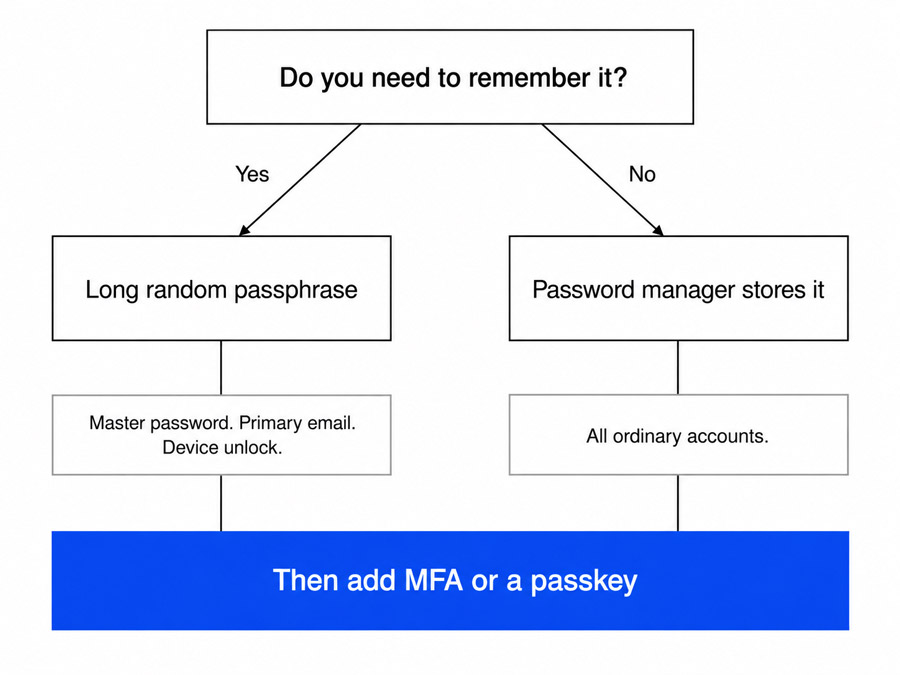
Do you need to remember it?
Yes → Use a long, random, memorable passphrase.
No → Let a password manager generate and store a unique password.
Is the account especially important?
Yes → Use a unique credential and add MFA or a passkey whenever possible.
Could the password have been exposed?
Yes → Replace it and review the account’s other security settings.
If you are unsure whether a password has been exposed, a breach-check tool or your password manager’s security dashboard will usually answer that faster than guessing.
Frequently Asked Questions
What is the easiest strong password to remember?
A long passphrase made from several independently selected, unrelated words is usually easier to remember than a random string of characters.
How many words should a strong passphrase have?
There is no universal magic number. More independent random words generally provide more unpredictability, while longer passphrases are usually easier to remember than dense strings of symbols.
Is a 16-character password strong enough?
Length is important, but a fixed character count alone does not determine strength. A unique, unpredictable password is much better than a predictable password that happens to meet a length requirement.
Can I use a sentence as my password?
You can, but a sentence based on a famous quote, song lyric, or recognizable phrase may be easier to predict than you expect. Random word selection is a safer approach.
Should every account have a different password?
Yes. Unique passwords prevent one compromised account from becoming a shortcut into your other accounts.
How can I remember a long password?
Use unrelated words, create a vivid mental image, and practice recalling the passphrase rather than repeatedly looking at it.
Should I use a password manager?
For most people, yes. A password manager removes the need to memorize a separate password for every account and makes unique credentials much easier to maintain.
What happens if I forget my master password?
In most cases it cannot be reset for you, because the provider does not hold the key to your vault. That is why recovery codes, an emergency contact option, or a securely stored backup should be set up on day one rather than after something goes wrong.
Are passkeys better than passwords?
When supported, passkeys can eliminate the need to create and remember a password for that service, and they are resistant to phishing in a way passwords are not. Support is now widespread across major platforms, though coverage is still patchy on smaller and legacy services, so passwords will remain part of the picture for a while yet.
The Bottom Line
Creating a strong password you can actually remember does not mean inventing a complicated string of characters and hoping your brain cooperates.
The smarter strategy is to remember less. Use a long, genuinely unpredictable passphrase for the few credentials that belong in your memory, and let a password manager generate unique passwords for everything else.
That approach works with human memory instead of fighting against it. And when you combine it with MFA or passkeys, strong account security becomes much less about remembering complicated rules and much more about using the right system.
The people with the best account security are rarely the ones with the most impressive passwords. They are the ones who decided, once, to stop memorizing and start delegating.
Your goal is not to remember every password. Your goal is to make every account hard to break.