
- Two-factor authentication (2FA) requires two different types of proof before granting account access.
- The most common factors are something you know, something you have, and something you are.
- 2FA can reduce the damage caused by stolen, leaked, or guessed passwords.
- Authenticator apps, passkeys, and security keys generally offer stronger protection than SMS codes.
- 2FA is not foolproof, so phishing, session theft, social engineering, and recovery security still matter.
- For important accounts, especially email, enabling a strong 2FA method is one of the most practical security improvements you can make.
A password can be completely correct and still be useless for proving that you are the person who should be signing in. Once a password is stolen, leaked, guessed, or captured through phishing, an attacker may have everything they need to enter a password-only account.
That is the problem two-factor authentication solves. Instead of trusting a single piece of information, 2FA asks for a second, different form of proof. Even when the password is compromised, the attacker may still be stopped at the next step.
What Is Two-Factor Authentication?
Two-factor authentication is a security method that requires exactly two different authentication factors before access is granted to an account, application, or service.
In a typical login, the first factor is your password. The second could be a code from an authenticator app, a security key, a passkey, or another approved method.
A simple 2FA example
Imagine signing into your email account. You enter your password, and the service then asks you to approve a login in an authenticator app. The password proves something you know; the device or authentication method provides another form of proof.
If someone has stolen your password but does not have the required second factor, the login can be blocked.
What Are the Three Authentication Factors?
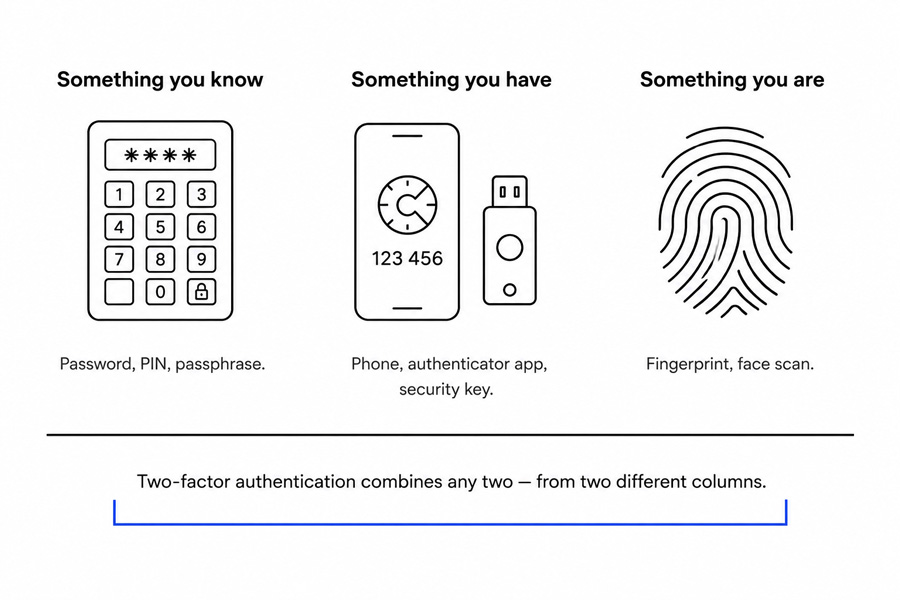
Authentication factors are generally grouped into three categories. Understanding them makes it much easier to understand what actually counts as 2FA.
Something you know
This is information that should be known only to you, such as a password, PIN, or passphrase.
Something you have
This is a physical device or credential in your possession, such as a smartphone, authenticator app, hardware security key, or registered device. The practical value of this category is that it cannot be copied remotely the way a password can — an attacker on another continent has to solve a physical problem, not just a data problem.
Something you are
This refers to a biometric characteristic, such as a fingerprint or facial recognition.
Do two login steps always mean 2FA?
No. Two steps do not automatically mean two factors. For example, entering a password and then answering a security question involves two steps, but both are based on something you know.
By contrast, a password followed by a code generated by an authenticator app uses two different factor categories. That is true two-factor authentication.
How Does Two-Factor Authentication Work?
- You enter your username and password.
- The service verifies the password.
- The service asks for your second authentication factor.
- You approve the request or enter the required code or credential.
- The service grants access if the second factor is valid.
The important part happens after the password has been accepted. A password alone no longer represents the complete authentication process.
For example, suppose your password appears in a data breach. An attacker may try that password on your email account. With 2FA enabled, the attacker could reach the second step but still be unable to complete the login without the required factor.
One detail that surprises people: most services will not ask for the second factor every single time. Once you mark a device as trusted, the prompt may not reappear for weeks. That is a convenience trade-off, and it is worth reviewing your trusted device list occasionally rather than letting it grow indefinitely.
Why Is Two-Factor Authentication Important?
The biggest weakness of password-only security is that passwords can be copied. Once somebody else obtains yours, the system has little way to distinguish you from an attacker.
2FA reduces that single point of failure by requiring additional evidence. Most advice stops at “turn on 2FA,” but the more useful point is that the method you choose changes how much protection you actually receive — and the gap between the weakest and strongest options is wider than most people expect.
It helps protect against stolen passwords
Passwords can be exposed through data breaches, phishing attacks, malware, password reuse, or credential stuffing. A second factor can prevent many of those stolen credentials from immediately becoming successful logins.
Think about the last time a verification code arrived on your phone when you were not signing in anywhere. That prompt is information, not just an annoyance. In most cases it means someone already has your password and is standing at the second door.
It reduces account takeover risk
Account takeovers can expose emails, files, private conversations, payment information, and other sensitive data. The consequences can extend well beyond the compromised account.
Your email account deserves special attention
Your primary email is often connected to password resets for other services. Protecting it with strong 2FA can therefore help protect several other accounts indirectly.
For the same reason, high-value accounts such as financial services, password managers, cloud storage, and business administration accounts should receive priority.
What Are the Different Types of 2FA?
SMS verification codes
A one-time code is sent to your phone by text message. SMS is familiar and much better than using no second factor, but it has weaknesses, including phishing and SIM-swapping attacks. It also depends on your mobile carrier’s account security, which is one layer you have limited control over.
Authenticator apps
Apps can generate time-based one-time passwords, often called TOTP codes. These codes can usually be generated without a cellular connection, which makes them more flexible than SMS.
However, the code itself can still be entered into a convincing phishing site, so an authenticator app is not automatically phishing-resistant.
Push notifications
A service sends an approval request to your authentication app. Push authentication is convenient, but attackers can abuse unexpected prompts in an attempt to pressure users into approving a malicious login.
Number matching can make push authentication safer because the user must confirm additional information rather than simply tapping “Approve.”
Security keys and hardware tokens
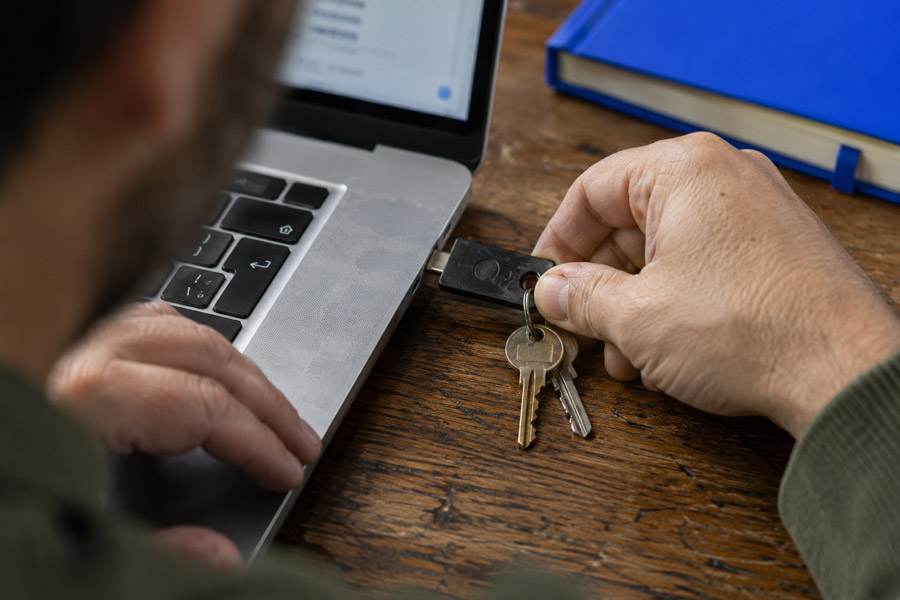
Physical security keys provide a strong form of authentication because the attacker generally needs the actual device. FIDO2 and WebAuthn-based security keys can also provide strong protection against phishing.
Passkeys
A passkey replaces the password with a cryptographic credential stored on your device or synced through your password manager, unlocked by a fingerprint, face scan, or device PIN. Strictly speaking, a passkey can complete a login on its own, which is why it is often described as passwordless rather than as a second factor. In practice it combines possession of the device with a biometric or PIN check, so the protection is comparable and frequently stronger.
The reason passkeys resist phishing is structural rather than behavioral: the credential is bound to the exact website it was created for, so it simply will not respond to a lookalike domain. Support has widened considerably across major platforms, browsers, and large consumer services, so it is worth re-checking accounts that did not offer passkeys the last time you looked.
Biometric authentication
Fingerprints and facial recognition are convenient ways to verify identity. However, a biometric check by itself does not automatically mean that an account is using two-factor authentication. It depends on how the service combines authentication factors.
Which 2FA Method Is the Most Secure?
| Method | Security | Phishing Resistance | Main Consideration |
|---|---|---|---|
| SMS code | Lower | Low | SIM swapping and phishing |
| Authenticator app | Moderate to high | Limited | Codes can still be phished |
| Push approval | High with number matching | Improved | MFA fatigue attacks |
| Security key | Very high | Strong | Must protect the physical key |
| Passkey | Very high | Strong | Recovery and device management |
The phrase “phishing-resistant” is doing a lot of work in that table, and it is worth defining. It means the credential is tied to a specific web address, so it cannot be handed to an imitation site even by a user who is fully convinced. Anything you can read off a screen and type somewhere else — an SMS code, a TOTP code — does not have that property, no matter how carefully it was generated.
For most people, an authenticator app or passkey is a strong practical choice. For especially sensitive accounts, passkeys and security keys can provide stronger phishing resistance.
If SMS is the only option a service provides, enabling SMS 2FA is generally preferable to relying on a password alone.
Is Two-Factor Authentication Safe?
2FA significantly improves account security, but it does not make an account invulnerable.
Attackers may attempt to bypass authentication through phishing, social engineering, SIM swapping, malware, session theft, or repeated push requests designed to cause accidental approval.
The technique most worth understanding today is real-time proxy phishing, sometimes described as an adversary-in-the-middle attack. Rather than storing your password to use later, the fraudulent page relays your login to the genuine service as it happens, passes the authentication prompt back to you, and captures the session token that gets issued the moment you approve. From your side, the login simply works. Nothing looks wrong. This is why the address bar still deserves a glance before you approve anything, and why phishing-resistant methods carry real weight rather than being a technical nicety.
What 2FA protects against
- Many stolen-password attacks
- Credential stuffing
- Password reuse attacks
- Many automated account takeover attempts
What 2FA does not completely prevent
- Phishing that captures credentials and active authentication
- Compromised devices
- Malware and session theft
- Social engineering
- Users approving fraudulent authentication requests
The goal is not to create perfect security. It is to make unauthorized access substantially harder and reduce the impact of a stolen password.
2FA vs MFA vs Two-Step Verification
2FA vs MFA
Two-factor authentication uses exactly two authentication factors. Multi-factor authentication can use two or more factors. That means every true 2FA setup is MFA, but MFA does not necessarily stop at two factors.
2FA vs two-step verification
Two-step verification simply means that there are two stages in the login process. Those stages do not necessarily use different authentication factors.
This distinction matters because adding another password question does not provide the same security benefit as combining a password with a separate possession or biometric factor. It is also why marketing language is worth reading closely — a service advertising “two-step” security is not always offering what a security professional would call 2FA.
Common 2FA Mistakes to Avoid
- Using SMS when a stronger authentication option is available.
- Approving a login request you did not initiate.
- Sharing a verification code with another person.
- Keeping backup codes where anyone can easily access them.
- Relying on only one recovery device for an important account.
- Storing your passwords and your only source of 2FA codes on the same device, with no backup elsewhere.
- Assuming 2FA makes you immune to phishing.
- Using weak or reused passwords simply because 2FA is enabled.
What Happens If You Lose Your Phone or Security Key?
2FA works best when recovery is planned in advance. Without a recovery method, even the legitimate account owner can become locked out.
Save backup codes in a secure location and, where supported, register a backup authentication device or additional security key. Keep recovery information current whenever you replace a phone or change your authentication setup.
The practical version of this advice: set up the second key or backup device on the same day you set up the first, while you still have access to everything. Recovery arrangements made after a phone is lost tend to be rushed, and rushed recovery is exactly the moment social engineering works best — on you and on the support agent trying to help you.
How to Set Up Two-Factor Authentication
- Open your account’s security settings.
- Find the 2FA or MFA option.
- Choose the strongest practical method available.
- Register your authenticator app, passkey, or security key.
- Complete the verification test.
- Save your backup recovery codes securely.
- Add a backup recovery method when appropriate.
Start with your primary email, financial accounts, password manager, work accounts, and cloud storage. These accounts often contain information that can unlock or affect many others. Working through five accounts properly beats switching on a weak method across fifty, and it fits alongside the rest of the everyday security habits that protect your data.
2FA Best Practices
- Prefer passkeys or security keys when strong phishing resistance is important.
- Use an authenticator app instead of SMS when practical.
- Never share one-time codes.
- Never approve an unexpected authentication prompt.
- Keep backup codes secure and accessible to you.
- Use unique passwords alongside 2FA.
- Review the active sessions and trusted devices listed in your account settings from time to time, and sign out anything unfamiliar.
- Keep your devices and software updated.
Frequently Asked Questions About 2FA
What is two-factor authentication in simple terms?
It is a login security method that requires two different types of proof before you can access an account, such as a password plus an authenticator code.
Is 2FA really necessary?
For important accounts, yes. It provides meaningful protection when passwords are stolen, leaked, guessed, or phished.
Can 2FA be hacked?
Some forms can be bypassed through phishing, social engineering, SIM swapping, or other attacks. Stronger methods, particularly passkeys and security keys, can reduce some of these risks.
Are passkeys the same as two-factor authentication?
Not exactly. A passkey usually replaces the password rather than adding a step after it, but unlocking one still requires both your device and a biometric check or PIN. For most everyday accounts, choosing a passkey is a security upgrade rather than a downgrade from password-plus-code.
Can an authenticator app work without internet?
Many TOTP authenticator apps can generate codes without an active internet connection or cellular signal. The service still needs to receive the code when you sign in.
Should I enable 2FA on every account?
Enable it wherever it is available, especially for accounts containing sensitive information or accounts that can reset access to other services.
Conclusion
Two-factor authentication is important because passwords are no longer a reliable security boundary by themselves. A stolen password should not automatically become a stolen account.
The strongest approach is to use 2FA intelligently: protect your most important accounts first, choose phishing-resistant methods when available, keep recovery options secure, and never treat an authentication prompt as something to approve automatically.
If you act on only one line of this article, make it this one — go and secure your primary email with the strongest method your provider supports, and store the backup codes somewhere you will actually find them again. Everything else in your digital life tends to route back through that inbox, and attackers have known it far longer than most account owners have.
The memorable rule is simple: your password proves what you know; 2FA helps prove that you also have something the attacker does not.